Installation Methods
1. Wall Installation
Drill 3 holes in the wall according to the dimension in table 2, put in the expansion plug Φ7.5×40mm, put the box to match the holes and use screws to fasten.
2. Pole Mounted Installation
Pass the hoop ring through the back plate slot and fix it on the telecom pole.
3. Aerial Installation
Attach the two mounting brackets to the aerial cable (strand), then secure them together with screws to prevent the closure from falling.
4. Wall-mounted Installation (with Drop Cable Storage Tray)
Drill 4 holes on the wall according to the dimension of the drop cable storage tray mounting hole, put in the expansion plug Φ7.5×40mm, put the box to match the holes and tighten with the screws.
5. Pole Mounted Installation (with Drop Cable Storage Tray)
Thread the stainless steel strap through the drop cable storage tray slot and secure it to the post with buckle.
6. Aerial Mount Installation (with Drop Cable Storage Tray)
Use the small metal plate to fix the distribution box to the messenger.
Connector Operation
1. Pre-connected Adapter - A (E)
Turn the arrow part of the fiber connector counterclockwise and pull out the dust cap. The arrow part of the fiber connector is up, insert the fiber connector into the socket and then turn the arrow part clockwise.
2. Pre-connected Adapter - B (XL)
- Insert the SC fiber optic connector plug through the loose parts and then connect it to the adapter
- Install the pre-terminated XL adapter sleeve to the adapter with a plastic wrench
- Insert the snap spring plug into the sleeve
- The cable clamp should be installed and the line should be close to the socket
- Screw the leather cable clamp seat cap into the sleeve clockwise
3. Pre-connected Adapter - C
- Push the slip ring of the fiber optic preformed plug in the direction of the arrow to remove the dust cap; press the button to take out the adapter dust cap in the direction of the arrow
- Align the body of the preformed plug with the adapter buckle until it is locked. Attach the two dust covers in the same way
- The pre-installed stopper pushes the slip ring to release the buckle and then pulls the main body back to separate it
4. Pre-connected Adapter - D
- Turn the pre-connected plug counterclockwise and open the pre-connected plug and dust cover in the direction of the arrow
- Connect the pre-connected D plug and the pre-connected D adapter in the direction of the arrow and turn the plug clockwise to fix it
5. Pre-connected Adapter - E (A)
- Turn the pre-connected plug counterclockwise and open the pre-connected plug and dust cover in the direction of the arrow
- Connect the pre-connected E plug and the pre-connected E adapter in the direction of the arrow and turn the plug clockwise to fix it
6. Pre-connected Adapter - SC
- Insert the SC fiber optic connector plug through the loose parts in turn and then connect it to the adapter
- Install the pre-attached XL adapter sleeve to the adapter with a plastic wrench
- Insert the snap spring plug into the sleeve
- The cable clamp should be installed and the line should be close to the socket
- Screw the seat cap of the leather cable clamp into the sleeve in a clockwise direction
Environmental Characteristics
This product complies with the ROHS environmental protection directive and the content of lead, cadmium, mercury, hexavalent chromium, polybrominated biphenyl (PBB) and polybrominated diphenyl ether (PBDE) does not exceed the limit.
Packaging
| Item | Material | Size(mm) | Amount | Gross Weight(kg) |
|---|---|---|---|---|
| Independent product packaging | Paperboard | 340×215×120 | 1 | 1.3 |
| Outer packing box | Paperboard | 450×360×630 | 10 | 14 |
Note: No drop cable storage tray
Ordering Information
| Part Number | Product Description |
|---|---|
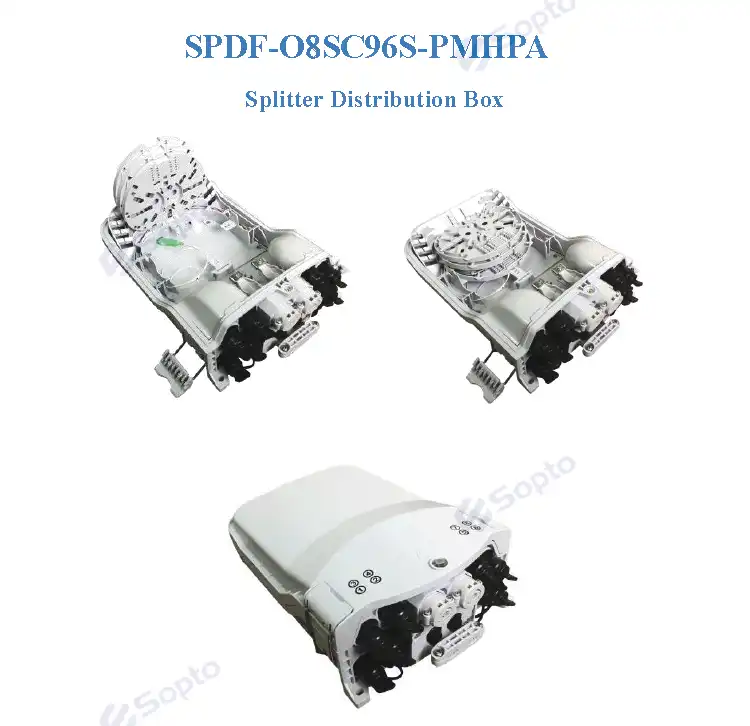
| SPDF-O8SC96S-PMHPA | Splitter Distribution Box Outdoor pole mounted/wall mounted 8 ports simplex SC/Duplex LC type 96 cores Fusion maximum capacity available for Steel tube splitter installation with hoop without adaptor, pigtails and splitter, Plastic Single door type A |
Applications
- FTTX fiber to the home networks
- Fiber optic communication network terminal connections
- Fiber splicing and splitter management
- Outdoor fiber distribution networks
- Metropolitan area network fiber distribution
- Fiber access network construction
Contact Information
Email: info@sopto.com.cn
Web: http://www.sopto.com.cn
Note: If you need more customized services, please contact us.
1 1.3 Outer packing box Paperboard 450×360×630 10 14Note: No drop cable storage tray
Ordering Information
| Part Number | Product Description |
|---|---|
| SPDF-O8SC96S-PMHPA | Splitter Distribution Box Outdoor pole mounted/wall mounted 8 ports simplex SC/Duplex LC type 96 cores Fusion maximum capacity available for Steel tube splitter installation with hoop without adaptor, pigtails and splitter, Plastic Single door type A |
Applications
- FTTX fiber to the home networks
- Fiber optic communication network terminal connections
- Fiber splicing and splitter management
- Outdoor fiber distribution networks
- Metropolitan area network fiber distribution
- Fiber access network construction
Contact Information
Email: info@sopto.com.cn
Web: http://www.sopto.com.cn
Note: If you need more customized services, please contact us.
Product Overview
The equipment is used as a termination point for the feeder cable to connect with drop cable in FTTX communication network system. The fiber splicing, splitting and distribution can be done in this box and meanwhile it provides solid protection and management for the FTTX network building.
Product Features
- Totally enclosed structure: Complete enclosed structure design
- High-quality material: PC+ABS material, wet-proof, water-proof, dust-proof, anti-aging, protection level up to IP65
- Multi-function integration: Clamping for feeder cable and drop cable, fiber splicing fixation, storage, distribution, etc.
- Flexible configuration: Supports multiple splitter tray configurations, can be mixed according to needs
- Multiple installation methods: Supports pole mounted, wall mounted and aerial structure installation
- Pre-connected adapters: Supports multiple pre-connected adapter types (A/B/C/D/E/SC)
Specifications
| Item | Specification |
|---|---|
| Number of Ports | 8 Ports |
| Connector Type | Simplex SC/Duplex LC |
| Maximum Fusion Capacity | 96 Cores |
| Protection Level | IP65 |
| Material | PC+ABS |
| Splitter Type | PLC 1×2/1×4/1×8/1×16 |
| Fiber Diameter | 0.9mm |
| Environmental Standard | Complies with ROHS environmental protection directive |
Splitter Tray Configuration
Product Overview
The equipment is used as a termination point for the feeder cable to connect with drop cable in FTTX communication network system. The fiber splicing, splitting and distribution can be done in this box and meanwhile it provides solid protection and management for the FTTX network building.
Product Features
- Totally enclosed structure: Complete enclosed structure design
- High-quality material: PC+ABS material, wet-proof, water-proof, dust-proof, anti-aging, protection level up to IP65
- Multi-function integration: Clamping for feeder cable and drop cable, fiber splicing fixation, storage, distribution, etc.
- Flexible configuration: Supports multiple splitter tray configurations, can be mixed according to needs
- Multiple installation methods: Supports pole mounted, wall mounted and aerial structure installation
- Pre-connected adapters: Supports multiple pre-connected adapter types (A/B/C/D/E/SC)
Specifications
| Tray Type | Splitter Capacity | Cores per Tray | Max Quantity |
|---|---|---|---|
| Type A | PLC 1×2 | 0.9mm fiber 60×7×4mm | 8 pcs |
| Item | Specification |
|---|---|
| Number of Ports | 8 Ports |
| Connector Type | Simplex SC/Duplex LC |
| Maximum Fusion Capacity | 96 Cores |