Product Overview
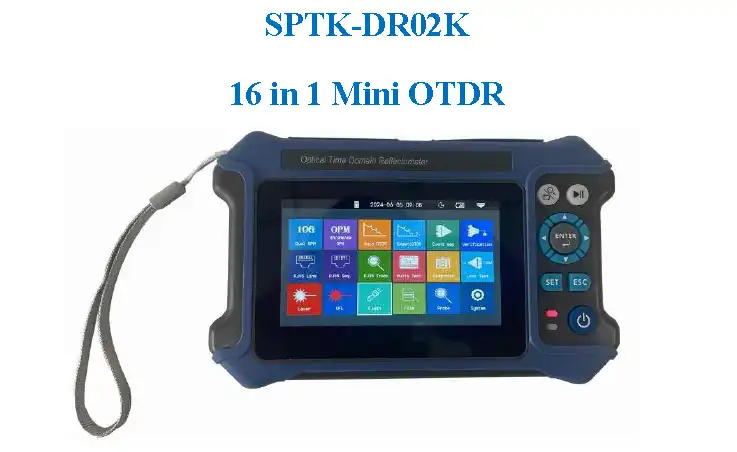
The SPTK-DR02K is a mini OTDR (Optical Time Domain Reflectometer) tester: a 16-in-1 mini OTDR with 1310/1550nm wavelengths, a maximum dynamic range of 28dB/26dB, and a testing distance of up to 80km. The device supports 1310/1550nm wavelength testing with a maximum dynamic range of 28dB/26dB and a testing distance of up to 80km. It integrates multiple functions, including OTDR testing, a Visual Fault Locator (VFL), and fiber end face inspection, making it an ideal tool for fiber optic network installation, maintenance, and troubleshooting.
Product Features
- 4.3-inch color LCD display
- Battery standby of up to 20 hours
- Body weight of only 350g
- One-key automatic test
- Shock-proof and drop-proof design
- Lighting function
- USB charging support
Product Specifications
OTDR Specifications
| Item | Specification |
|---|---|
| Wavelength | 1310/1550nm |
| Fiber Type | G.652 SM fiber |
| Dynamic Range | 28dB/26dB |
| Event Dead Zone | 3m |
| Attenuation Dead Zone | 8m |
| Test Range | 5m ~ 80km |
| Pulse Width | 5ns ~ 10μs |
| Ranging Accuracy | ±(1m + sampling interval + 0.005% × test distance) |
| Linearity | ±0.2dB/dB |
| Sampling Points | 16k ~ 128k |
| Sampling Resolution | 0.05m ~ 8m |
| Reflection Accuracy | ±3dB |
| Data Storage | Internal: ≥600; External: TF card |
| Laser Safety Level | Class II |
| File Format | SOR standard file format |
| Connector | FC/UPC (interchangeable SC/ST) |
10G OPM Specifications
| Item | Specification |
|---|---|
| Calibration Wavelength | 1490nm, 1577nm |
| Measurement Range | +10 ~ -40 dBm |
| Isolation | 1577nm >35dB, 1490nm >35dB |
| Uncertainty | ±5% |
| Interface Type | Universal joint FC/SC/ST |
OPM Specifications
| Item | Specification |
|---|---|
| Wavelength Range | 800nm ~ 1700nm |
| Calibration Wavelength | 850/980/1300/1310/1490/1550/1625/1650nm |
| Measurement Range | -50dBm ~ +26dBm |
| Uncertainty | ±5% |
| Interface Type | Universal joint FC/SC/ST |
LS Specifications
| Item | Specification |
|---|---|
| LD Type | FP-LD |
| Output Wavelength | 1310/1550nm |
| Output Power | ≥-5dBm |
| Modulation Frequency | CW/270/1k/2kHz |
| Stability | CW ±0.5dB/15min (tested after 15 minutes of preheating) |
| Connector | FC/UPC (interchangeable SC/ST) |
VFL Specifications
| Item | Specification |
|---|---|
| Operating Wavelength | 650nm ± 20nm |
| Output Power | ≥10mW |
| Mode | CW/1Hz/2Hz |
| Connector | FC/SC/ST |
RJ45 Cable Tracker
| Item | Specification |
|---|---|
| Mode | Digital tracking |
| Distance | ≥300m |
| Online/Line Pair Tracking | Supported |
Optical Loss Test
| Item | Specification |
|---|---|
| Wavelength | Consistent with LS |
| IL Test | Supported |
ONU Resources
| Item | Specification |
|---|---|
| Distance/Loss/Event/Fiber | Distance/loss/event/broken fiber |
General Parameters
| Item | Specification |
|---|---|
| Display | 4.3-inch color LCD |
| Data Interface | Micro USB |
| External Storage | TF card |
| Power Supply | Polymer Li-ion battery: 3.7V 4000mAh; power adapter: 5VDC 2A |
| Battery Life | Standby >20h; measuring time >12h |
| Operating Temperature | -10°C ~ +50°C |
| Storage Temperature | -40°C ~ +70°C |
| Relative Humidity | 0 ~ 95% (non-condensing) |
| Weight | ≤400g |
| Dimensions | 180mm × 11mm × 44mm |
Function Description
Auto OTDR Test
One-key automatic test function that can automatically set the wavelength and measurement time; other parameters are automatically selected by the instrument. Based on Rayleigh scattering and Fresnel reflection principles, it can measure fiber length, fiber transmission attenuation, splice attenuation, and fault location. Note: Do not perform online testing except at online wavelengths!
Expert OTDR
Provides a professional-grade OTDR test function and supports event map display, allowing detailed analysis of each event point in the fiber optic link. Supports curve scaling: X-axis/Y-axis zoom in or out for precise analysis.
OTDR Settings
Measurement wavelength: The test wavelength is selected according to the actual wavelength of the machine. Measurement range: Select the corresponding length range according to the actual length of the optical fiber. It must be greater than the length of the fiber under test and is usually set to about twice the length of the fiber under test. Pulse width measurement: Refers to the time width of the optical pulse signal emitted during measurement. The larger the pulse width, the stronger the optical power injected into the fiber and the stronger the backscattered signal of the fiber, allowing the OTDR to effectively detect farther. However, a large pulse width will cause saturation of the initial reflected signal, resulting in a large blind zone. The choice of pulse width is related to the length of the measured fiber. Measurement time: The measurement time in average measurement mode. The longer the detection time, the better the signal-to-noise ratio improvement and the more accurate the test results. The user should reasonably choose the measurement time, and the measurement time is proportional to the measurement dynamics. Event loss threshold: Sets the loss threshold of the connection point, splice point, or macrobend that can be tested. The value ranges from 0.2dB to 30dB. The default value is 0.25dB.
OTDR Line Analysis
The event list includes: Total length (indicates the total length of the link under test), Total loss (indicates the total loss of the link under test), Test wavelength (indicates the measurement wavelength used for the link under test), Range (indicates the measurement range of the link under test), and Pulse width (indicates the measured pulse width used for the link under test). In the event list: Serial number (indicates the sequence of the current event), Type (indicates the type of the current event point), Distance (the location of the current event point), Loss (the loss value of the current event point), Total loss (the cumulative loss value of the current event point), Slope (loss per kilometer from the starting point to the current event point), and Reflection (the return loss value of the current event point).
File Management
By default, the test data file is saved in the local machine (TF card). When saving, you can select the save location via the pop-up option. Press File to enter the file operation window. You can search for, open, and delete files.
Intelligent Diagnosis
Intelligently checks the status of optical network terminal resources and judges the terminal connection status of the client ONT line in the corridor fiber box without entering the house, meeting the needs of on-site port release and resource data verification and achieving fine management of network resources. At the same time, the link loss between the splitter and the client is measured for low-light diagnosis.
10G Dual OPM
The split-wave optical power meter is mainly used for commissioning, installation, and maintenance of 10GEPON/XGPON FTTx services. It not only has the function of a general optical power meter, but also has downlink 1490nm and 1577nm wavelength split power measurement designed for 10GE-PON/XGPON, and displays the respective power values of the two wavelengths on the same screen. This allows you to truly grasp the power value of a single-wavelength optical signal on the line and accurately determine whether the optical power value meets the standard. Reference: Sets the current power to the reference power. Calibration: Enters calibration mode. Zero setting: Zeroes the reference power.
Optical Power Meter (OPM)
Absolute power, relative power, and linear power value conversion formula: P_Absolute = 10LgP_Linear/1mW, P_Absolute = P_Absolute - P_Reference. Used for signal power testing and insertion loss testing of various equipment and photoelectric components. Wavelength: Switches the test wavelength of the power meter. Reference: Sets the current power to the reference power. Calibration: Enters calibration mode. Threshold: Sets the power measurement threshold. If the power measurement value is higher than the threshold, it is marked in red; if it is lower than the threshold, it is marked in green.
Stable Light Source (LS)
Stable light source with the same functional wavelength as the OTDR, used for testing and maintenance of fiber optic communication systems.
Visual Fault Locator (VFL)
By injecting visible light (red light) into the fiber and observing the light leakage position on the measured fiber, the location of the fiber fault point can be easily and accurately determined. This function is suitable for detecting bare fiber, fiber jumpers, and other fibers that can leak red light near the fault point of the fiber cable, as well as high-loss areas caused by micro-bending. Warning: Avoid looking directly at the laser output port; laser radiation can damage human eyes!
RJ45 Cable Tracker
Digital tracking mode, test distance ≥300m, supports online/line pair tracking. Cable length test: Tests the length of the network cable. Calibration: Corrects the measured length of the network cable. Network cable standard: T568A/T568B. The color sequence of the network cable varies according to the standard. Line sequence measurement: Connect the remote module at the bottom of the instrument when testing. There are two types of RJ45 connector cables: straight-through and crossover.
Optical Loss Test
The light source and power meter are displayed at the same time, which is convenient for testing the insertion loss, isolation, and return loss of optical passive devices. Optical loss measurement steps: 1) Connect the LS and OPM optical interfaces with a standard jumper first, press [Open], and after the power is stable, press [Reference]. 2) Connect the tested part and read the "loss" value, which is the insertion loss of the tested part.
ONU Resources Test
Can test distance, loss, events, and broken fiber conditions.
End Face Inspection (Optional)
Optical fiber end face inspection and cleaning is an important step to ensure the quality of optical fiber communication. Contamination or damage to the optical fiber end face will lead to signal attenuation, reflection loss, and unreliable connections. Therefore, regular inspection and cleaning of the optical fiber end face is crucial to ensure effective optical transmission. The USB interface end face detector suitable for this instrument can inspect and clean the end face of the test link to ensure the quality and reliability of link communication transmission.
Warning
Forcing the use of light at non-online test wavelengths will cause damage to the internal components of the instrument! Making any changes or modifications that are not expressly permitted in this manual will cause you to lose the right to operate the equipment. To reduce the risk of fire or electric shock, do not expose this device to thunderstorms or damp conditions. To prevent electric shock, do not open the housing; the device must be repaired by qualified personnel designated by the manufacturer. When using this instrument, do not look directly at the laser output or the end of the optical fiber with your eyes to avoid eye damage or even blindness.
Notice
Battery and adapter: The battery inside the machine is a special polymer lithium battery; the charging voltage is 5V/1A, and the charging temperature range is 0°C ~ 50°C. Charging will automatically stop when the ambient temperature is too high. Recharge the instrument once every month to avoid the battery being unable to be used normally due to self-discharge during long storage. The temperature range for long-term battery storage is -20°C ~ 50°C.
Applications
- FTTX secondary backbone network
- Engineering construction
- Maintenance and emergency repair
- Optical fiber and cable testing and production measurement
Ordering Information
| Product Model | Product Description |
|---|---|
| SPTK-DR02K | 16-in-1 Mini OTDR, 1310/1550nm, Max dynamic range 28dB/26dB, 80km |
Contact Information
Email: info@sopto.com.cn
Web: http://www.sopto.com.cn
Note: For customized solutions, please contact us.